 en
en Italian
 German
 French
 Spanish
 Russian
By default MP3 Recorder Studio captures all sound to the same file during one recording session. It means, if you click “Record” button only once, only one file will be created, no matter how much time the recording will last.
If you need to split this file into smaller ones, the program will eagerly do it for your. Just select an appropriate option.
On the main window, click “Splitting and Recording Options” tab.

The lower part of the window changes. Take a look at “Splitting Options” area:
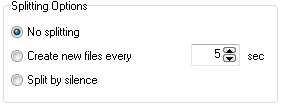
There are three options.
- “No splitting” means that all sound will be captured into one file. If you check “Skip silence” box in the “Silence options” area, all silence will be skipped, but when a sound activity is detected again, it will be recorded to the same file.
- “Create new files every … sec” is self-explainable. It means that the program will start a new file, if time exceeds the given value. Time counter will be reset. Useful, if you need to limit file size, or to make your files easy to review and maintain. “Skip silence” option will also work here, if checked.
- “Split by silence” means that the program will start new file every time when silence is detected. You can record or skip silence exactly as in the other two cases.
No matter what option your choose, all files will be recorded into given quality and format. They can be previewed using built-in player.


